Official Meta-Approved WhatsApp Business API Provider
WhatsApp Broadcasts: Send Official Messages via WhatsApp Business API
Broadcast WhatsApp Messages to Unlimited Users, Instantly!
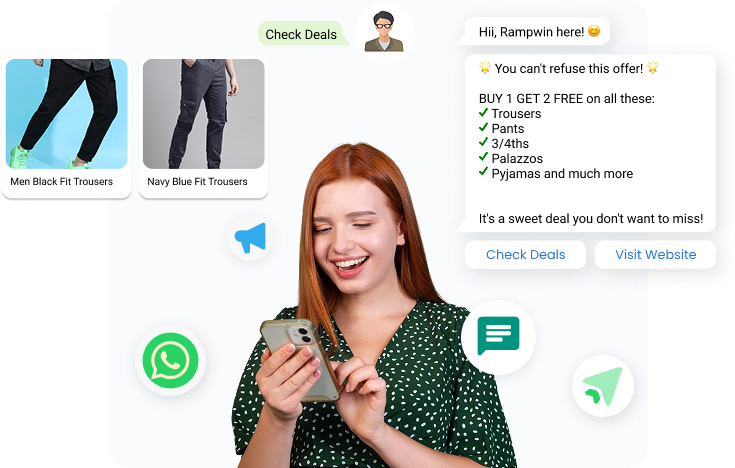
Send product updates, newsletters, and promotional offers to your audience in one go without getting blocked.
With Rampwin, sending WhatsApp Broadcasts becomes effortless, helping you connect faster, engage better, and deliver real results.
Unlimited Contacts
Broadcast to unlimited users with personalized, media-rich messages, from customer names to interactive carousels, all designed to boost engagement.
Targeted, Smarter Campaigns
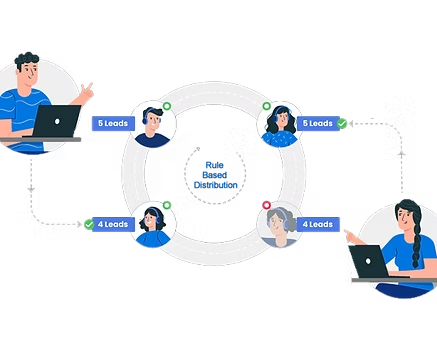
Use smart filters and past interactions to target the right audience and re-engage users at the perfect time.
Carousel Cards and Interactive Button Messages
Send visually engaging messages with images or videos, complete with actionable buttons that drive up to 70% more clicks.
How to Broadcast Messages with Rampwin
Follow these simple steps to send a WhatsApp Broadcast using Rampwin and maximize your reach:
Lorem ipsum dolor sit amet, consectetur adipiscing elit. Ut elit tellus, luctus nec ullamcorper mattis, pulvinar dapibus leo.
Name Your Campaign
Takes ~30 seconds – 1 minute
Go to the “Broadcasts” tab and click “Create Campaign.”
Give your campaign a clear, keyword-friendly name (max 50 characters).
A good name helps you track performance and search for campaigns later.
Choose Your Sending Channel
Takes ~15 seconds
Pick the WhatsApp number, Facebook page, or Instagram account you want to send your campaign from.
Each campaign is linked to a specific sender — making it easier to track performance and manage replies.
Use names like Rampwin Chat Commerce, Rampwin Support, or Rampwin IG to align with your communication goal (sales, support, announcements).
Channels marked with Cloud API indicate verified WhatsApp Business senders.
Select or Upload Your Audience
Takes ~30 seconds – 1 minute
Choose from your existing contacts using filters like tags, names, company, or past actions.
Or click “Upload Contacts” to add a fresh list via CSV — no complex formatting required.
Use filters like blacklist status, appointment date, or reseller type to segment precisely.
Targeting the right people improves engagement and lowers opt-outs.
Choose a Message Template
Takes ~1–2 minutes
Select from your approved WhatsApp message templates using the dropdown.
You can search by name to quickly find the right template. Each template is pre-approved by WhatsApp and categorized (e.g., quiz, carousel, lead drop).
Need a new one? Click “Create Template” to submit a fresh message for approval.
Use variables (like customer name or order ID) to personalize your message dynamically.
Send a Test Message
Takes ~10 seconds
Choose one or more internal contacts to preview your message before it goes live.
Ensure variables (like name or order ID) display correctly, and the format looks perfect.
This helps you catch typos, layout issues, or delivery problems before sending at scale.
You can also skip this step if you’ve already tested the template before.
Review & Launch Your Campaign
Takes ~15 seconds
See a complete summary of your campaign, including:
Campaign name
Total contacts selected
WhatsApp template used
Estimated cost
Preview your personalized message before sending.
Choose when to send: Immediately or Schedule for later.
Optionally enable “Retry Campaign” to automatically resend to failed numbers.
Features
Increase customer engagement with live chat features your team will love
Lorem ipsum dolor sit amet, consectetur adipiscing elit. Ut elit tellus, luctus nec ullamcorper mattis, pulvinar dapibus leo.
Omni Channel
Lorem ipsum dolor sit amet, consectetur adipiscing elit. Ut elit tellus, luctus nec ullamcorper mattis, pulvinar dapibus leo.
Ticketing Helpdesk
Lorem ipsum dolor sit amet, consectetur adipiscing elit. Ut elit tellus, luctus nec ullamcorper mattis, pulvinar dapibus leo.
ChatBot
Lorem ipsum dolor sit amet, consectetur adipiscing elit. Ut elit tellus, luctus nec ullamcorper mattis, pulvinar dapibus leo.
Whatsapp API Business
Lorem ipsum dolor sit amet, consectetur adipiscing elit. Ut elit tellus, luctus nec ullamcorper mattis, pulvinar dapibus leo.
Marketing & Broadcast Campaign
Lorem ipsum dolor sit amet, consectetur adipiscing elit. Ut elit tellus, luctus nec ullamcorper mattis, pulvinar dapibus leo.
Reports & analytics
Lorem ipsum dolor sit amet, consectetur adipiscing elit. Ut elit tellus, luctus nec ullamcorper mattis, pulvinar dapibus leo.
Support Integrations.
Lorem ipsum dolor sit amet, consectetur adipiscing elit. Ut elit tellus, luctus nec ullamcorper mattis, pulvinar dapibus leo.
Why Choose Us
Our Solutions Have Been Proven
to Enhance Business Performance
No hidden fees. No surprises
Gravida habitant est mus hac torquent mollis letius venenatis consectetuer.
Manage taxes, automatically
Gravida habitant est mus hac torquent mollis letius venenatis consectetuer.
Supports 190+ countries
Gravida habitant est mus hac torquent mollis letius venenatis consectetuer.
Provides 24/7 live support
Gravida habitant est mus hac torquent mollis letius venenatis consectetuer.
Testimonial
Client Feedback & Reviews
★★★★★Rated 4.5 out of 5
Chattera has revolutionized our business communication! The real-time chat feature keeps our team connected, no matter where we are. It's intuitive to use, and the customization options allow us to align it perfectly with our brand. Thanks to Chattera, we've streamlined our workflow and improved collaboration among team members.
Sarah T.Entrepreneur
Chattera's chatbot has been a game-changer for our customer support. It efficiently handles common queries, freeing up our team to focus on more complex issues. The integration with third-party apps has simplified our processes, and we've seen a significant increase in customer satisfaction since implementing Chattera. Highly recommend it for any business!
Alex M.Small Business Owner
As a start-up, we needed an all-in-one chat solution, and Chattera exceeded our expectations. The analytics feature has been incredibly helpful in understanding user behavior and improving our services. The team at Chattera has been responsive and supportive throughout our journey. It's the perfect chat service for growing businesses!